Setting up the program with macros for Rust Web
Our recent development allows you to use macros for Rust through a web browser without downloading anything to your PC. This method is the safest, and the main feature is that you can run our website on an Android phone, making it a full-fledged 2 PC setup. In this guide, we will explain how to set up macros for Rust Web.
The MAKCU board is required for operation and must be flashed according to the MAKCU instructions.
Using via PC
Here you will find options for using via 1 PC or 2 PC without using a phone.
Device connection for 1 PC
Connect USB 1 and 2 to the main PC. Connect the mouse to USB 3.
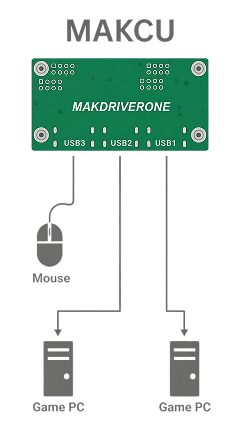
Device connection for 2 PC
Connect USB 1 and 2 to the second PC (USB 2 Second PC). Connect the mouse to USB 3.

Program setup
Go to our website, in your personal account click on Program -> Use vilonity.com/profile?s=downloads. Use Google Chrome as it works best. Other browsers may not work.

Click Connect Device and select USB Serial Device. After successful connection, the button will change to Disconnect Device.

Next, set all settings the same as in the game. Since we cannot receive data from the keyboard, we must choose in which mode to control recoil: standing or crouching.
You can also assign binds to the side mouse buttons and the mouse wheel click.
Using via phone
Here you will find options for using via phone. Only Android is supported. iPhone support is not possible due to lack of the required API.
Device connection
Connect the MAKCU device to the phone via USB OTG.

Program setup
Go to our website, in your personal account click on Program -> Use vilonity.com/profile?s=downloads. Use Google Chrome as it works best. Other browsers may not work.
Scan the QR code.

Click Connect Device and select USB Serial Device.
After successful connection, the button will change to Disconnect Device.

Next, set all settings the same as in the game. Since we cannot receive data from the keyboard, we must choose in which mode to control recoil: standing or crouching.
You can also assign binds to the side mouse buttons and the mouse wheel click.